Creating Multilingual Audio Content Is Still a Nightmare in 2026 — Here Is the Fix
Quick Answer: Creating multilingual audio content in 2026 is still painfully complex. Most TTS platforms require separate tools, accounts, or API configurations per language — and voice cloning across languages produces accent leakage and pronunciation errors. AI Narrator solves this with 50+ native-quality AI voices accessible directly from a single Google Docs sidebar, with no per-language setup required.
| Problem | Typical Platform Behavior | Impact on Creators |
|---|---|---|
| Language-specific voice limits | English has 50+ voices, other languages have 2-5 | No meaningful voice choice for non-English content |
| Inconsistent quality across languages | English is polished, other languages sound robotic | Multilingual audiences get a worse experience |
| Accent leakage in cloning | Cloned voice carries source language accent | Brand voice sounds foreign in other languages |
| Per-language API configuration | Different endpoints, models, or parameters per language | Engineering overhead scales linearly with languages |
| Undocumented language failures | Some languages silently fail or return empty audio | Hours of debugging before discovering a language is unsupported |
Single Interface, 50+ Languages
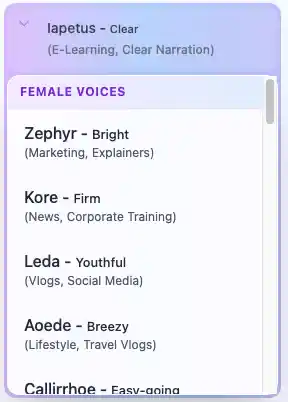
No separate tools, no per-language accounts, no API configuration. Open the AI Narrator sidebar in Google Docs, select your target language from a dropdown, and generate. English, Spanish, French, German, Hindi, Bengali, Chinese, Japanese, Korean, Arabic, Vietnamese, Tamil, Telugu, and 37 more — all from the same sidebar.Native-Quality Voices Per Language
Each language has dedicated native-quality AI voices optimized for that language's phonetics, intonation, and rhythm. You are not getting an English model forced to speak Spanish — you are getting a voice trained specifically for Spanish narration.Zero Accent Leakage
Because AI Narrator uses native voices per language rather than cloning an English voice across languages, there is no accent leakage. Your Spanish narration sounds naturally Spanish. Your Hindi narration sounds naturally Hindi.Auto-Detection or Manual Selection
AI Narrator can auto-detect the language of your document and select the appropriate voice, or you can manually choose a specific language and voice. Either way, the process is a single click — no configuration files, no API parameters.
| Use Case | Preset | Languages Available |
|---|---|---|
| Multilingual podcast | Casual Talk or News Broadcast | 50+ languages with consistent tone |
| Global e-learning courses | Lecture & Concepts | Hindi, Spanish, French, Chinese, and more |
| International audiobooks | Storyteller or Cozy Read | European and Asian languages with native pacing |
| Multilingual marketing videos | Commercial Voiceover | Any supported language with upbeat delivery |
Step 1: Open Your Document
Your blog post or script lives in Google Docs. No export, no copy-paste, no format conversion needed.
Step 2: Select Language and Voice
Open the AI Narrator sidebar. Choose your target language (e.g., Spanish) and a voice preset (e.g., Storyteller). The entire language library is in one dropdown.
Step 3: Generate and Download
Click Generate Audio. AI Narrator processes the document and delivers a high-quality WAV file. Repeat for each additional language — typically under 2 minutes per language.
Step 4: Repeat for Other Languages
Switch the language dropdown to Hindi, French, or any of the 50+ supported languages. The same document, the same workflow, different native voice. No new tools, no new accounts, no new configurations.
| Metric | Traditional Approach | AI Narrator |
|---|---|---|
| Tools needed for 5 languages | 3-5 platforms | 1 (Google Docs sidebar) |
| Account signups | 3-5 (one per platform) | 0 (free Google account) |
| Time per language | 30-60 min (setup + generation) | 2-3 min (switch dropdown + generate) |
| Voice consistency | Different quality per platform | Consistent presets across all languages |
| Accent leakage risk | High (cloned voices) | None (native voices per language) |
| Cost for 5 languages × 20 docs | $50-$200+ | Free (limited tier) |
URL to Audio (Multilingual)
Paste a web page URL, select a target language, and get a narrated audio file in that language. Perfect for translating English blog posts into multilingual podcast episodes.PDF to Audio (Multilingual)
Upload a PDF in any supported language. AI Narrator detects the language or lets you choose, and generates native-quality narration.Word to Audio (Multilingual)
Upload .docx or .txt files and generate audio in any of the 50+ supported languages. Handles multilingual documents with mixed-language content.
- Complete Guide to Multilingual Text-to-Speech — Deep dive into multi-language TTS best practices.
- TTS Engines with Widest Language Support 2026 — Which platforms support the most languages.
- AI Voice Cloning Guide 2026 — How to clone your voice for multilingual use.
- How to Use AI Voices for E-Learning — Creating multilingual educational content.
Ready to go multilingual? Install AI Narrator for free and generate audio in 50+ languages directly from your Google Docs — no extra tools, no accent leakage, no per-language setup required.
Möchten Sie diese Stimmen selbst hören?
Testen Sie unseren AI Narrator jetzt kostenlos. Keine Anmeldung erforderlich.
Bereit, AI Narrator auszuprobieren?
Beginnen Sie noch heute mit der Umwandlung Ihrer Google Docs in professionelles Audio. Für immer kostenlos!
Zum Doc hinzufügen - Kostenlos