त्वरित उत्तर: ऑडियोबुक के लिए सर्वश्रेष्ठ AI नैरेटर प्रीसेट Storyteller (समृद्ध, सिनेमाई नैरेटिव गति के लिए) और Cozy Read (गर्म, अंतरंग कहानी कहने के लिए) हैं। AI Narrator के प्रीसेट वॉयस प्रोफाइल का उपयोग करने से रचनाकारों को जटिल कॉन्फ़िगरेशन छोड़ने और सीधे Google Docs से मिनटों में प्राकृतिक, अभिव्यंजक ऑडियोबुक फ़ाइलें जनरेट करने की अनुमति मिलती है।
📖 Storyteller प्रीसेट
फिक्शन, उपन्यासों और नाटकीय कथाओं के लिए अनुकूलित। रहस्य और भावनात्मक गहराई को पकड़ने के लिए थोड़ी धीमी गति के साथ फीचर-समृद्ध मिड-टोन्स।🍃 Cozy Read प्रीसेट
संस्मरणों, स्वयं-सहायता पुस्तकों और निबंधों के लिए सर्वश्रेष्ठ। Cozy Read गर्म, नरम और अंतरंग मुखर विशेषताओं का उपयोग करता है जो श्रोता के साथ तत्काल विश्वास बनाता है।🎙️ Deep Narrative प्रीसेट
रहस्यों, विज्ञान-फाई, या गहरी गैर-काल्पनिक कथाओं के लिए एकदम सही। एक आधिकारिक, निम्न-रजिस्टर आवाज़ है जो गंभीरता और नाटकीय स्वर प्रदान करती है।
| प्रीसेट नाम | टोन / शैली | सर्वश्रेष्ठ शैली |
|---|---|---|
| कहानीकार | समृद्ध, नाटकीय | फिक्शन, उपन्यास |
| कोज़ी रीड | वार्म, सॉफ्ट | स्मृतियाँ, सेल्फ-हेल्प |
| डीप नैरेटिव | आधिकारिक, निम्न | साइंस-फिक्शन, थ्रिलर |
| क्लियर स्कॉलर | स्पष्ट, कुरकुरा | जीवनी, पाठ्यपुस्तकें |
चरण 1: विशेष वर्णों को साफ़ करें
AI वॉयस इंजन विराम चिह्नों और टेक्स्ट को शाब्दिक रूप से पढ़ते हैं। डबल डैश, अत्यधिक विस्मयादिबोधक चिह्न और ब्रैकेटेड नोट्स हटा दें।
उन संक्षिप्त रूपों को लिखें जिन्हें पूर्ण शब्दों के रूप में पढ़ा जाना चाहिए (उदाहरण के लिए, यदि नैरेटर अटकता है तो "Dr." के बजाय "Doctor" लिखें)।
चरण 2: प्राकृतिक पैराग्राफ ब्रेक जोड़ें
AI Narrator पैराग्राफ ब्रेक पर प्राकृतिक विराम डालता है। अपने ऑडियोबुक श्रोताओं को अनुभागों के बीच शांति की सांस देने के लिए टेक्स्ट के अत्यधिक लंबे ब्लॉकों से बचें।
सबसे अच्छी लयबद्ध गति के लिए पैराग्राफ को 3-4 वाक्यों से कम रखें।
चरण 3: अपना ऑडियोबुक प्रीसेट चुनें
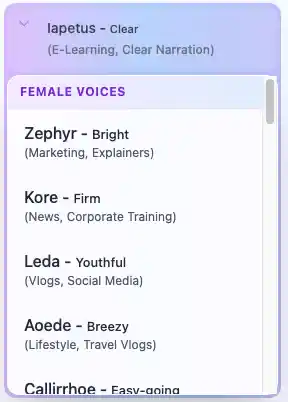
Google Docs में AI Narrator साइडबार खोलें। वॉयस विकल्प ड्रॉपडाउन से "Storyteller" या "Cozy Read" प्रीसेट चुनें।
ये प्रीसेट प्राकृतिक ऑडियोबुक प्रवाह के लिए अंतर्निहित संश्लेषण मापदंडों को पहले से कॉन्फ़िगर करते हैं।
चरण 4: जनरेट और डाउनलोड करें
Generate Audio पर क्लिक करें। AI Narrator आपके दस्तावेज़ को अनुभाग दर अनुभाग संसाधित करेगा। एक बार पूरा हो जाने पर, उच्च-गुणवत्ता वाली WAV फ़ाइल डाउनलोड करें।
फ़ाइलें ACX या Findaway Voices जैसे ऑडियोबुक प्लेटफ़ॉर्म पर प्रकाशित करने के लिए तैयार हैं।
प्रो-टिप: हमेशा पहले एक अध्याय या पृष्ठ का परीक्षण करें। संपूर्ण पांडुलिपि को बदलने से पहले स्वर, गति और भावनात्मक डिलीवरी की जांच करने के लिए जनरेट किए गए आउटपुट को सुनें।
- Google Docs को ऑडियो फ़ाइलों में कैसे बदलें — चरण-दर-चरण ऑडियो रूपांतरण विधियाँ।
- Google Docs में टेक्स्ट टू स्पीच के लिए संपूर्ण गाइड — सर्वोत्तम प्रथाओं के साथ पूर्ण ट्यूटोरियल।
- ई-लर्निंग के लिए AI आवाज़ों का उपयोग कैसे करें — शैक्षिक सामग्री के लिए अनुकूलित वॉयस प्रीसेट।
- AI Narrator बनाम ElevenLabs — ऑडियोबुक उत्पादन के लिए AI Narrator की तुलना कैसे करें।
अपना ऑडियोबुक बनाने के लिए तैयार हैं? AI Narrator को मुफ़्त में इंस्टॉल करें और अपना पहला अध्याय मिनटों में जनरेट करें।
क्या आप स्वयं ये आवाजें सुनना चाहते हैं?
अभी हमारे AI नैरेटर को निःशुल्क आज़माएँ। कोई साइन-अप आवश्यक नहीं है.
AI Narrator को आज़माने के लिए तैयार हैं?
आज से अपने Google Docs को पेशेवर ऑडियो में बदलना शुरू करें। हमेशा के लिए मुफ्त!
Doc में जोड़ें - यह मुफ़्त है