AI Narrator vs Natural Reader: Confronto del miglior strumento gratuito di sintesi vocale
AI Narrator vs Natural Reader: Confrontiamo l'integrazione di Google Docs, la qualità vocale, il valore del livello gratuito e le funzionalità di accessibilità. Scopri quale strumento TTS gratuito è giusto per te.
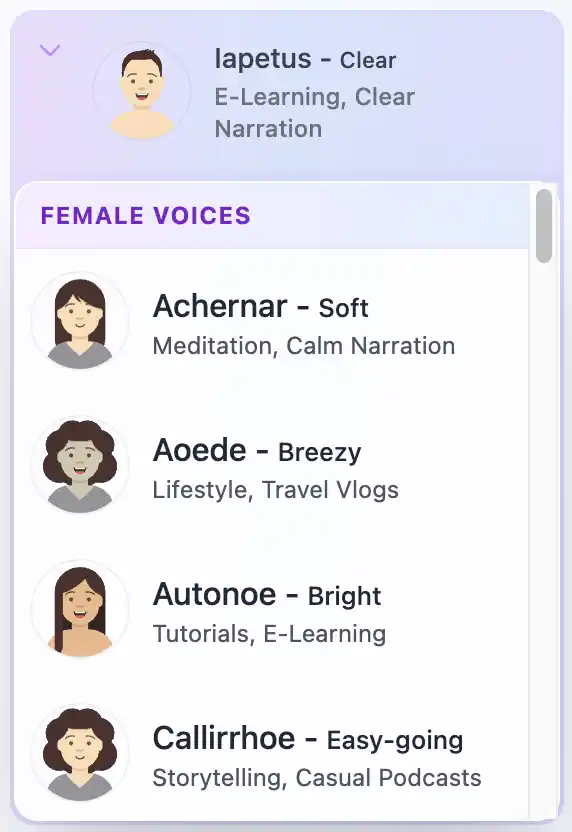
Risposta rapida: AI Narrator è la scelta migliore per gli utenti di Google Docs che vogliono convertire documenti in file audio scaricabili. Natural Reader è un solido strumento di lettura personale, ma manca di integrazione con Google Docs, offre meno preset vocali e limita il suo livello gratuito solo alle voci di base.
| Funzionalità / Criterio | AI Narrator | Natural Reader |
|---|---|---|
| Integrazione Google Docs | ✅ Estensione barra laterale nativa | ❌ Nessuno |
| Caso d'uso principale | Conversione da documento ad audio | Lettura personale e screen reading |
| Piano gratuito | ✅ Gratis per sempre (32 voci) | ⚠️ Limitato solo alle voci di base |
| Download WAV | ✅ Incluso nel piano gratuito | ⚠️ Piano a pagamento richiesto per i download |
| Preset vocali | 18 preset ottimizzati per genere | 15+ voci generiche |
| Estensione Chrome | ❌ Componente aggiuntivo Google Docs | ✅ Sì |
| App mobile | ❌ Basato su browser | ✅ iOS e Android |
| Lingue | 15 | 20+ |
1. Conversione da documento ad audio
AI Narrator è progettato specificamente per convertire Google Docs in audio. Apri la barra laterale, selezioni un preset vocale e generi un file WAV scaricabile. Natural Reader ti consente di incollare il testo e ascoltarlo in tempo reale, ma non è progettato per la conversione in massa di documenti o per creare file audio persistenti da documenti lunghi.2. Qualità vocale e preset
Natural Reader offre voci TTS standard che suonano naturali per brevi passaggi ma diventano monotone su contenuti di lunga durata. AI Narrator fornisce 18 preset specifici per genere (Storyteller, Lecture & Concepts, Executive Pitch) che sono preconfigurati per ritmo, tono ed enfasi specifici per il tuo tipo di contenuto.3. Valore del piano gratuito
Natural Reader limita le sue voci migliori ai piani a pagamento. AI Narrator include tutti i 18 preset vocali nel suo piano gratuito a vita con download WAV. Per gli utenti che necessitano di un output audio regolare senza abbonamento, AI Narrator offre un valore significativamente maggiore.
Scegli AI Narrator se:
Scrivi in Google Docs e vuoi convertire interi documenti in file audio WAV scaricabili.
Hai bisogno di preset vocali specifici per genere ottimizzati per audiolibri, conferenze, podcast o presentazioni.
Vuoi uno strumento gratuito a vita con supporto per 15 lingue e senza paywall per i download.
Sei un educatore, uno scrittore o un creatore di contenuti che necessita di un output audio persistente.
Scegli Natural Reader se:
Hai bisogno di un rapido strumento di lettura personale per pagine web, PDF o email.
Vuoi un'estensione Chrome che legga il testo ad alta voce su qualsiasi sito web.
Hai bisogno di un'app mobile per l'ascolto in movimento.
Cerchi un'alternativa di base allo screen reader per scopi di accessibilità.
Conclusione: Natural Reader è un discreto strumento di lettura personale, ma non può competere con AI Narrator per la conversione da documento ad audio, i preset vocali o il valore del piano gratuito. Prima di decidere, ascolta i campioni di AI Narrator per sentire la qualità della voce in prima persona. Se usi Google Docs, prova AI Narrator gratuitamente e scopri la differenza.
Vuoi sentire tu stesso queste voci?
Prova subito gratuitamente il nostro Assistente vocale AI. Non è richiesta la registrazione.
Riproduci campioni vocaliPronto a provare l'Assistente vocale AI?
Inizia oggi stesso a convertire i tuoi documenti Google in audio professionale. Gratis per sempre!
Aggiungi al Doc - È gratis