Respuesta rápida: Los mejores preajustes de narrador de IA para audiolibros son Storyteller (para un ritmo narrativo rico y cinematográfico) y Cozy Read (para una narración cálida e íntima). El uso de perfiles de voz preestablecidos de AI Narrator permite a los creadores omitir configuraciones complejas y generar archivos de audiolibro naturales y expresivos en minutos directamente desde Google Docs.
📖 Preajuste Storyteller
Optimizado para ficción, novelas y narraciones dramáticas. Tonos medios ricos con un ritmo ligeramente más lento para capturar el suspenso y la profundidad emocional.🍃 Preajuste Cozy Read
Ideal para memorias, libros de autoayuda y ensayos. Cozy Read utiliza características vocales cálidas, suaves e íntimas que generan confianza inmediata con el oyente.🎙️ Preajuste Deep Narrative
Perfecto para misterios, ciencia ficción o no ficción profunda. Presenta una voz autoritaria de registro bajo que proporciona gravedad y tono dramático.
| Nombre del preajuste | Tono / Estilo | Mejor género |
|---|---|---|
| Narrador | Rico, dramático | Ficción, novelas |
| Lectura acogedora | Cálido, suave | Memorias, autoayuda |
| Narrativa profunda | Autoritario, bajo | Ciencia ficción, thrillers |
| Clear Scholar | Articulado, nítido | Biografías, libros de texto |
Paso 1: Limpiar caracteres especiales
Los motores de voz de IA leen la puntuación y el texto literalmente. Elimina guiones dobles, signos de exclamación excesivos y notas entre corchetes.
Escribe las abreviaturas que deban leerse como palabras completas (por ejemplo, escribe "Doctor" en lugar de "Dr." si el narrador se atasca).
Paso 2: Agregar saltos de párrafo naturales
AI Narrator inserta pausas naturales en los saltos de párrafo. Evita bloques de texto excesivamente largos para dar a tus oyentes de audiolibros un respiro de silencio entre secciones.
Mantén los párrafos por debajo de 3-4 oraciones para obtener el mejor ritmo.
Paso 3: Seleccionar tu preajuste de audiolibro
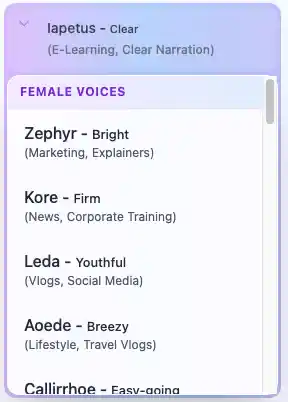
Abre la barra lateral de AI Narrator en Google Docs. Elige el preajuste "Storyteller" o "Cozy Read" del menú desplegable de opciones de voz.
Estos preajustes preconfiguran los parámetros de síntesis subyacentes para un flujo de audiolibro natural.
Paso 4: Generar y descargar
Haz clic en Generar audio. AI Narrator procesará tu documento sección por sección. Una vez completado, descarga el archivo WAV de alta calidad.
Los archivos están listos para publicarse en plataformas de audiolibros como ACX o Findaway Voices.
Consejo profesional: Prueba siempre la narración de un solo capítulo o página primero. Escucha el resultado generado para verificar el tono, el ritmo y la entrega emocional antes de convertir todo el manuscrito.
- Cómo convertir Google Docs en archivos de audio — Métodos de conversión de audio paso a paso.
- Guía completa de texto a voz en Google Docs — Tutorial completo con mejores prácticas.
- Cómo usar voces por IA para aprendizaje electrónico — Preajustes de voz optimizados para contenido educativo.
- AI Narrator vs ElevenLabs — Cómo se compara AI Narrator para la producción de audiolibros.
¿Listo para crear tu audiolibro? Instala AI Narrator gratis y genera tu primer capítulo en minutos.
¿Quieres escuchar estas voces tú mismo?
Pruebe nuestro Narrador AI gratis ahora mismo. No es necesario registrarse.
¿Listo para probar AI Narrator?
Comienza a convertir tus Google Docs en audio profesional hoy. ¡Gratis para siempre!
Agregar al Doc - Es gratis