Try AI Narrator Free
Sign up free — no credit card required. Turn your documents into natural-sounding audio in minutes.
Sign Up FreeTry AI Narrator Free
Experience the voices mentioned in this article. Install the Google Docs add-on and generate audio from any document in seconds.
Browse All VoicesGoogle Docs के लिए सर्वश्रेष्ठ टेक्स्ट-टू-स्पीच एक्सटेंशन: AI Narrator समीक्षा
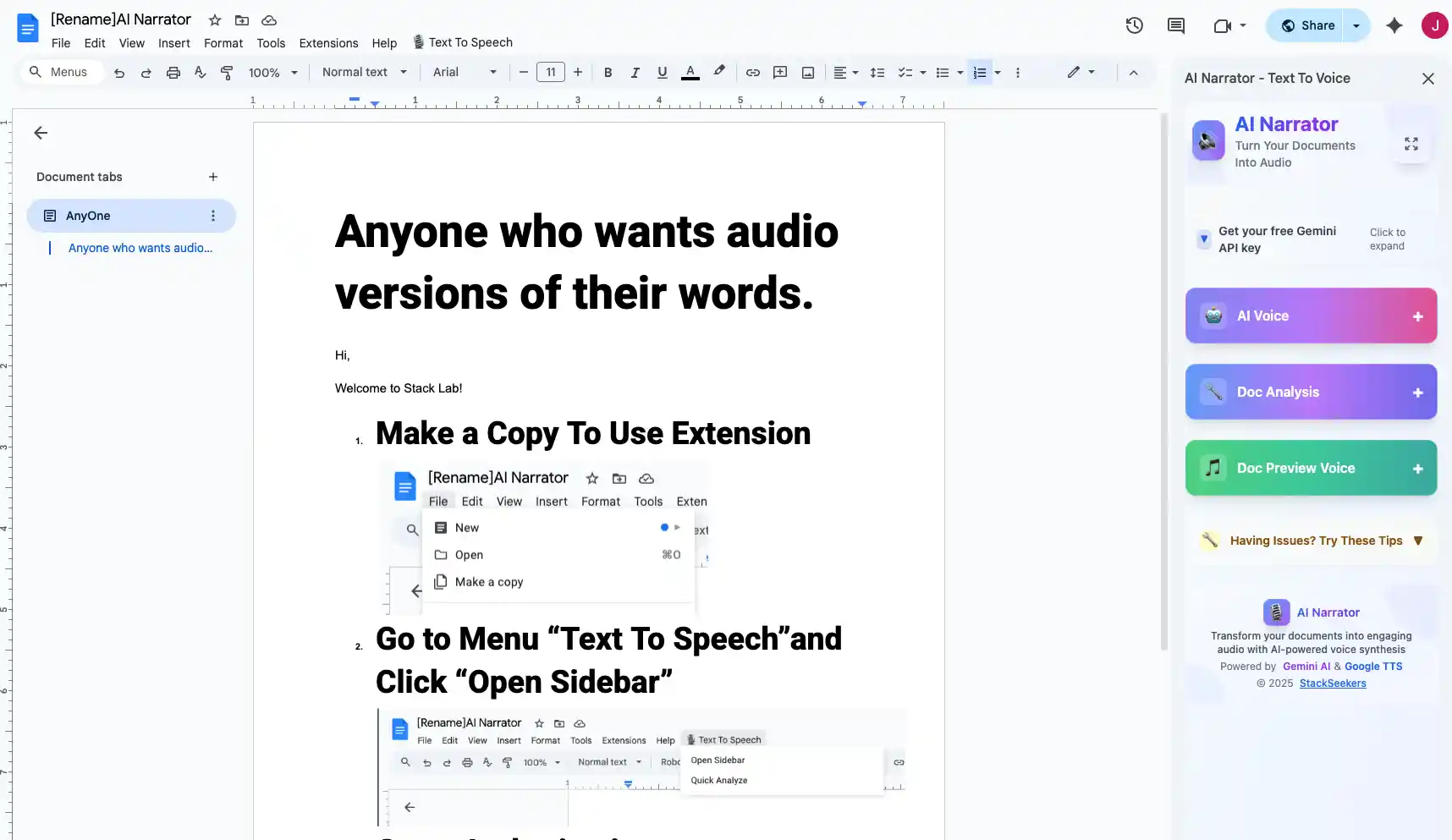
क्या आप स्वयं ये आवाजें सुनना चाहते हैं?
अभी हमारे AI नैरेटर को निःशुल्क आज़माएँ। कोई साइन-अप आवश्यक नहीं है.
एक बेहतरीन एक्सटेंशन को बिना किसी रुकावट के एकीकृत होना चाहिए, उच्च-गुणवत्ता वाली आवाज़ें प्रदान करनी चाहिए, कई भाषाओं का समर्थन करना चाहिए, और ऑडियो निर्यात की अनुमति देनी चाहिए। इसे आपके ब्राउज़र को धीमा किए बिना या जटिल सेटअप की आवश्यकता के बिना काम करना चाहिए। AI Narrator इन सभी क्षेत्रों में उत्कृष्ट है।
एक-क्लिक इंस्टाल
क्रोम वेब स्टोर से सेकंडों में इंस्टॉल होता है29+ AI आवाजें
व्यावसायिक आवाज़ें जो प्राकृतिक और आकर्षक लगती हैंइन-डॉक्यूमेंट इंटरफ़ेस
नए टैब खोले बिना Google डॉक्स के अंदर काम करता है15+ भाषाएं
मूल लहजों के साथ वैश्विक भाषाओं के लिए समर्थन
AI Narrator विशेष रूप से Google Docs के लिए बनाया गया है। सामान्य Chrome TTS एक्सटेंशन के विपरीत, यह दस्तावेज़ संरचना को समझता है — यह शीर्षकों पर रुकता है, पैराग्राफ ब्रेक का सम्मान करता है, और सूचियों को स्वाभाविक रूप से पढ़ता है। यह इसे प्रूफरीडिंग, कंटेंट क्रिएशन और पहुंच के लिए आदर्श बनाता है। जानें कि AI Narrator के साथ Google Docs को ज़ोर से कैसे पढ़ें।
अधिकांश TTS एक्सटेंशन सीमित आवाज़ विकल्प और रोबोटिक ध्वनि गुणवत्ता प्रदान करते हैं। AI Narrator 29+ न्यूरल आवाज़ों के साथ अलग दिखता है जो पेशेवर वॉयस एक्टर्स को टक्कर देती हैं। यह WAV निर्यात, बहुभाषी समर्थन और सहज Google Docs एकीकरण भी प्रदान करता है जो अन्य टूल्स में नहीं है। सुगम्यता पर ध्यान केंद्रित करने वालों के लिए, AI Narrator की प्राकृतिक आवाज़ें लंबे सत्रों के दौरान श्रवण थकान को कम करती हैं।
AI Narrator को आज़माने के लिए तैयार हैं?
आज से अपने Google Docs को पेशेवर ऑडियो में बदलना शुरू करें। हमेशा के लिए मुफ्त!
Doc में जोड़ें - यह मुफ़्त हैचरण 1: Chrome Web Store से इंस्टॉल करें
Chrome Web Store में "AI Narrator" खोजें और Add to Chrome पर क्लिक करें। एक्सटेंशन एक क्लिक में इंस्टॉल हो जाता है।
चरण 2: कोई भी Google Doc खोलें
AI Narrator पैनल आपके Google Docs संपादक के दाईं ओर अपने आप दिखाई देता है।
चरण 3: ऑडियो जनरेट करें
टेक्स्ट चुनें या "पूरा दस्तावेज़" चुनें। आवाज़ चुनें, सेटिंग समायोजित करें, और जनरेट पर क्लिक करें। आपका ऑडियो सेकंड में तैयार है।
चरण 4: डाउनलोड या प्ले करें
अपने ब्राउज़र में सीधे ऑडियो चलाएं या Pro प्लान पर WAV फ़ाइल के रूप में डाउनलोड करें। इसे दूसरों के साथ साझा करें या अपने प्रोजेक्ट में उपयोग करें।
| फ़ीचर | AI Narrator | सामान्य एक्सटेंशन |
|---|---|---|
| आवाज़ की गुणवत्ता | न्यूरल AI | बेसिक TTS |
| आवाज़ों की संख्या | 29+ | 3-5 |
| भाषाएँ | 21 | 5-8 |
| WAV निर्यात | हाँ (Pro) | नहीं |
| दस्तावेज़ संरचना | सम्मानित | अनदेखा किया गया |
Disclosure
Some of the tools compared on this site — including AI Narrator — are our own products. We review them on the same footing as competitors, on current pricing and hands-on testing, and always tell you when a product is ours.